
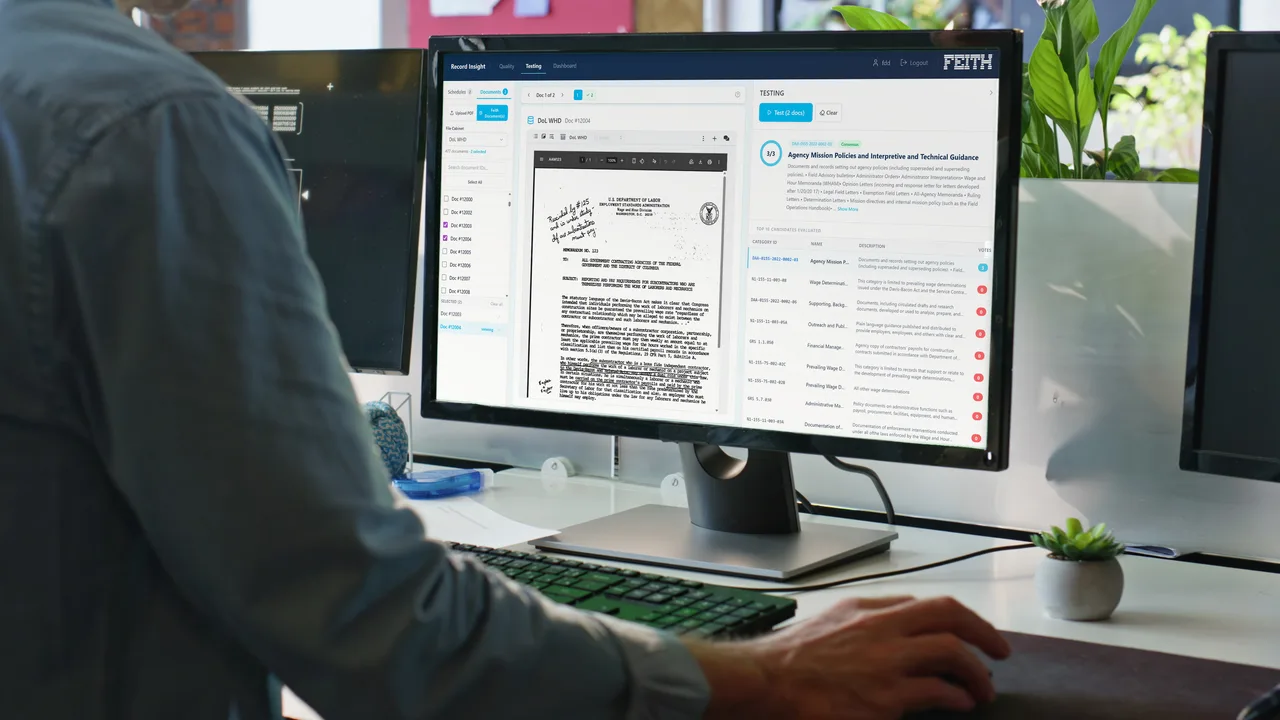
Every Google record, under NARA control.
Google Workspace runs your team's workday. Google Vault covers eDiscovery. Feith adds everything else the federal records lifecycle requires (capture at creation, automatic classification, multi-step disposition, and transfer to the National Archives) without changing how anyone works in Drive, Gmail, or Docs.
Workspace and Vault already cover real ground.
Before you add anything, a federal Google deployment handles a meaningful slice of records work at the platform level.
Retention rules across core surfaces
Administrators set retention and deletion rules for Gmail, Drive, Chat, Meet recordings, and Groups, scoped by organizational unit, user, group, or date range.
Legal hold and eDiscovery
Vault places preservation holds on accounts and content, exports collected material for legal review, and produces audit trails of who searched what and when.
Drive labels and basic classification
Drive labels apply metadata to files, can be required by policy, and drive sharing restrictions and DLP rules: a basic classification taxonomy with per-label permissions.
Audit logs and admin reporting
Workspace produces granular audit logs across user, admin, and content events, exports them to BigQuery or a SIEM, and reports on sharing posture and external access.
New connector capabilities ship on a roughly quarterly cadence, prioritized by federal customer demand. See the Google connector mechanics
Full UERM coverage for Google Workspace.
NARA's Universal Electronic Records Management specification defines the complete federal records lifecycle. Feith covers all six categories for records in Workspace.
Capture
Feith carries the records obligation from the moment of creation, with NARA-aligned metadata applied at capture.
Maintenance & use
One repository where Google records are co-managed with every other source: single search, single hold, single chain of custody.
Disposal
Disposition on time- and event-based triggers, with the sign-off your rules require, granted individually or in bulk.
Transfer
Automated packaging and accessioning of permanent records to NARA in the formats it accepts, with proof of completeness.
Metadata management
NARA-mandated fields applied at capture, maintained across the lifecycle, and exported with the record at transfer or disposition.
Reporting
Records-officer dashboards: holdings inventory, disposition status, transfer readiness, hold population, and exceptions against schedules.
6 of 6 The full NARA UERM lifecycle.
RMA iQ closes every gap, on top of the Google you already run.
Feith's records engine, RMA iQ, is system-agnostic and connects to Workspace through an out-of-the-box connector. The moment a file is created in Google, RMA iQ captures the record, its attachments, and its metadata into one managed repository.
Feith complements Vault. Where eDiscovery already runs through Vault, it keeps running. RMA iQ adds the records lifecycle on top: capture into a managed repository, NARA categorization, multi-step disposition, federal transfer. Vault holds and Feith holds coexist.
Day-forward capture via the Google connector
The connector activates the moment a file is created or uploaded in Google. RMA iQ captures the record, its attachments, its metadata, and its supporting documentation through Drive, Vault, and Workspace APIs.
Automatic NARA categorization
Captured records are indexed and categorized against NARA's General Records Schedule and your agency-specific Record Control Schedules, populating the mandated metadata fields at capture, not later.
One cross-source records repository
Google records live in the same repository as records from M365, ServiceNow, Salesforce, file shares, and case systems. One search, one hold, one chain of custody across every source.
Rule-driven disposition with sign-off
Disposition runs inside RMA iQ on time- and event-based triggers. Your rules set the sign-off each disposition needs, from Legal, the business unit, or the records team, granted individually or in bulk, and every disposition leaves a defensible log.
Automated NARA accessioning
Records that qualify for permanent preservation are automatically packaged in NARA-accepted formats and transferred to the National Archives, with documentation of completeness and provenance attached.
Full UERM metadata across the lifecycle
NARA-aligned metadata is captured at ingest, maintained as the record moves through holds, locations, and policy changes, and exported with the record at transfer or disposition.
Records-officer dashboards and exceptions
Officers see holdings inventory, disposition pipeline, transfer readiness, and hold population in one place, with exception reporting against schedules. Reports export for FOIA, OIG, and Congressional inquiries.
Litigation hold across every source
A single hold action in RMA iQ applies across Google and every other captured source at once, with hold-population reporting and full chain of custody. Vault holds remain where eDiscovery already runs through Vault.
The engine behind these capabilities: see RMA iQ
No agency's records live only in Google.
Every agency on Workspace also runs case systems, financial and HR systems, file shares and often M365. A records program that handles only Google handles only part of the agency.
One search, every source
A FOIA team searching for “policy memos referencing Project Phoenix” gets ranked results from Google Drive, M365 SharePoint, the case system, and the file share, with provenance on every hit.
One hold, every source
A litigation hold issued in RMA iQ applies across Google, M365, file shares, and case systems simultaneously, with a single hold-population report covering every captured source.
One disposition policy, every source
A record categorized as policy correspondence is dispositioned the same way whether it began in Google Drive, SharePoint, or a network share. The schedule lives in RMA iQ, not in the source platform.
For the full list of source connectors (Google, M365, ServiceNow, Salesforce, Documentum, file shares, and more), see Integrations & Capture
One record. Four stages. Twenty-five years.
The Google deployment never changes. The user never thinks about records management. The agency stays compliant for the full lifecycle: here, one policy document from a shared Drive to permanent accession at the National Archives.
- 01
A draft policy document is saved in a shared Drive.
- Source surface
- Google Drive · shared drive · agency/policy/
- Captured by
- RMA iQ Google connector · automatic at creation
- What's captured
- File · version history · sharing permissions · Drive labels · user metadata
- Auto-categorized
- Policy correspondence · 25-year permanent retention (per agency RCS)
- 02
The record lives in RMA iQ alongside everything else.
- Repository
- RMA iQ · cross-source · M365 + case system + Google co-resident
- Litigation hold
- Applied once by the records officer · enforced across every captured source
- Search
- FOIA, congressional inquiries, and internal audits return one unified result set
- Schedule
- Retention managed in Feith · users keep working in Drive as before
- 03
Year 25: disposition review triggers.
- Trigger
- Workflow fires at retention end · case status checked
- Approval 1
- Records officer · review and sign
- Approval 2
- Second records officer · transfer-readiness check
- Final check
- Completeness validated against captured metadata and attachments
- 04
Transmission to NARA. The lifecycle closes cleanly.
- Package
- NARA-accepted accession bundle · documentation of completeness and provenance
- Transmission
- NARA transfer package · manifest and transfer logs auto-generated
- Agency record
- Closed in RMA iQ · audit trail preserved · disposition documented
- Result
- Permanent record preserved in the National Archives
RMA iQ runs anywhere a records program has to.
Federal records programs span mission boundaries. Workspace runs in commercial and FedRAMP High-capable government configurations. Feith runs across that range, and onto classified networks Google doesn't reach.
Commercial cloud / FedRAMP Moderate
Google Workspace government editions
Feith Cloud (FedRAMP Moderate authorized) or your agency private cloud
On-premises federal
Workspace is cloud-first; on-premises is outside its primary posture
RMA iQ in your data center, fully air-gapped if required
Classified network (IL-6, up to IL7 / TS-SCI)
Google Workspace government editions cover the collaboration side; classified-network operation is not in its footprint
RMA iQ deployed on the classified network
The same engine that handles your unclassified Google records handles your most sensitive records, on the same federal architecture, an approach vetted and accepted by multiple federal agencies and Intelligence Community partners.
A records program your officer can certify.
Records implementations move at the speed of policy and schedule alignment, not technology.
Schedule alignment session
Your retention schedule, GRS applicability, and agency-specific RCS go into a working session with Feith. The categorization rules that drive RMA iQ are drafted against your real authorities.
Records-officer dashboards live
Capture runs against your pilot organizational unit. Drive, Gmail, and Docs records flow in with NARA metadata at intake. You see holdings, disposition pipeline, and transfer readiness in one place, enough to begin certifying coverage to leadership.
Cross-source records program
Full Workspace tenant covered. Disposition workflows run on event triggers. The first permanent records are packaged for NARA. The program is audit-defensible, the officer is in control, and Google still feels like Google to users.
Same engine for every Workspace records obligation.
Federal agencies are only the start. State and local governments, public universities, and regulated industries all run Workspace at scale and all face their own retention and public-records rules, handled on the same architecture.
Bring your Workspace tenant into full UERM compliance.
Request received.
Thanks. We'll reach out shortly.